


Descargador rápido y gratuito de imágenes Magnific — Extrae fotos e imágenes de alta resolución sin marca de agua
¿Quieres una extracción de imágenes más rápida? Simplemente arrastra el botón de abajo a la barra de marcadores de tu navegador. Al navegar por Magnific, haz clic en tu marcador para extraer al instante la URL de la imagen en máxima resolución.
Atajo para mostrar la barra de marcadores: (Ctrl + Shift + B) o (Cmd + Shift + B)
↑ Arrastra este botón a tu barra de marcadores ↑
Magnific Downloader es una herramienta en línea gratuita y avanzada creada para permitirte descargar fácilmente imágenes Magnific y fotos mejoradas de alto DPI sin marcas de agua. Ya sea que necesites elementos visuales premium a tamaño completo para arte creativo, activos de marketing o proyectos de diseño, nuestro magnific free downloader ofrece acceso instantáneo en resoluciones personalizadas sin requerir instalación de software ni suscripciones de pago.
Si prefieres la extracción con un solo clic sin copiar enlaces manualmente, nuestro Bookmarklet para el navegador ofrece extracción directa de URL:
Arrastra el botón "Magnific URL Extractor" de arriba directamente a la barra de marcadores de tu navegador.
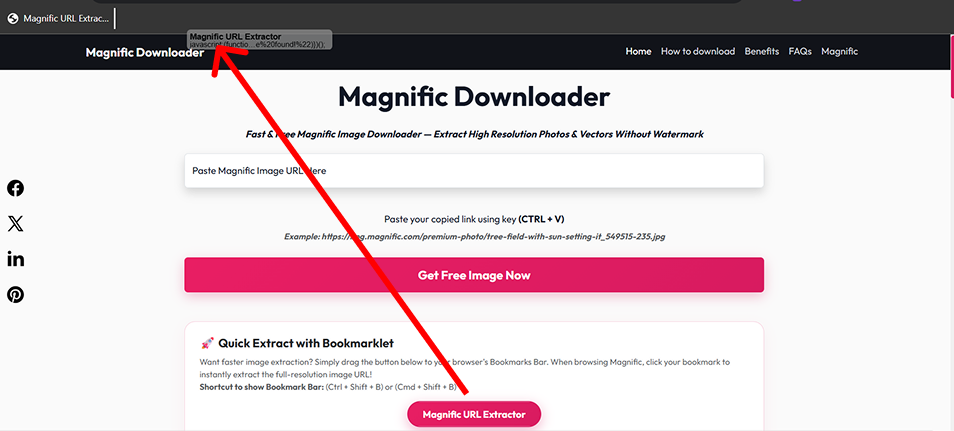
Abre cualquier página de arte en Magnific.com y haz clic en tu marcador guardado.
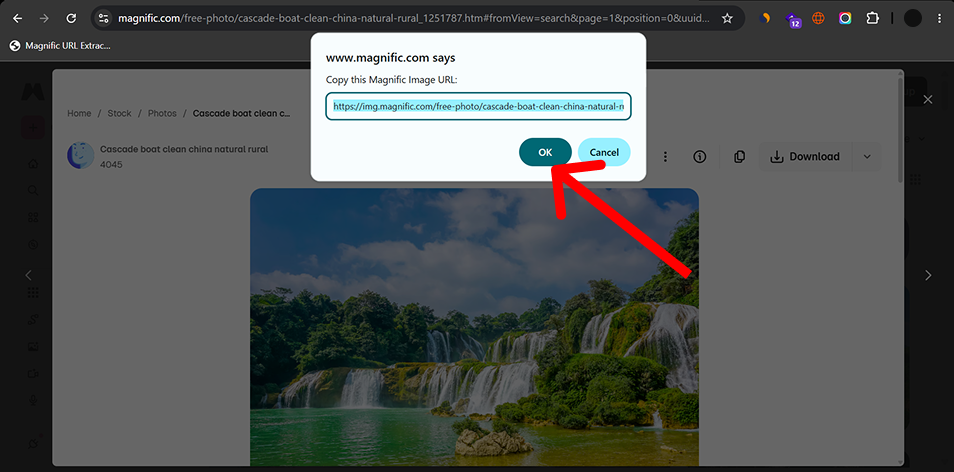
¡Copia la URL de la imagen extraída del aviso y pégala en el campo de descarga de arriba!
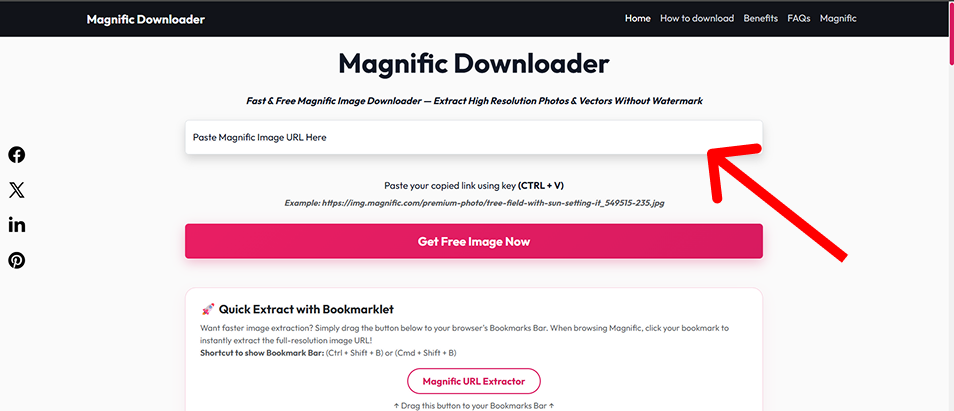
Descarga fotos Magnific de calidad original y activos mejorados sin marcas añadidas ni artefactos de compresión.
Magnific Downloader no requiere registro de cuenta ni impone cuotas de descarga diarias en URLs compatibles.
Nuestro motor de extracción patentado consulta directamente la fuente del archivo original, lo que garantiza velocidades de descarga ultrarrápidas en comparación con otras herramientas.
No almacenamos tus descargas ni rastreamos tu comportamiento. Todo sucede del lado del cliente y a través de conexiones seguras y encriptadas.
Diseñadores gráficos y artistas que necesitan activos de imagen de alta resolución para campañas de clientes, obras de arte digitales e impresión comercial.
Administradores de redes sociales que buscan elementos visuales nítidos para Instagram, anuncios de Facebook y tableros de Pinterest sin molestas marcas de agua.
Creadores de contenido que necesitan fotos de stock premium para mejorar la estética de sus artículos y blogs.
Desarrolladores que obtienen imágenes de marcadores de posición de alta calidad y activos listos para la web para maquetas y prototipos de UI/UX.
The available resolution depends on the source image. When supported, the downloader can prepare images in common web-friendly formats.
| Format | Best For | Transparency | Typical Use |
|---|---|---|---|
| JPEG | Photos and photographic artwork | No | Web, social media, general image use |
| PNG | Graphics requiring lossless output | Yes | Design work, editing, transparency |
| WebP | Optimized web images | Yes | Websites and web applications |
Ideal for compact web previews, mobile card thumbnails, and lightweight quick embeds.
Well-suited for standard article body layouts, social media feeds, and balanced web delivery.
Largest available output option for detailed viewing, editing and high-DPI use.
Actual availability depends on the source image and the resolutions available for that image.
Selecting the right file container ensures optimal visual quality while keeping bandwidth and storage overhead minimal.
Photography, large visual images, smaller file sizes
Broad compatibility, efficient compression
No transparency, lossy compression
Graphics, screenshots, transparent assets
Lossless, transparency
Usually larger files
Websites, modern web applications
Efficient compression, supports transparency
Some older software may have limited support
| Use Case | Recommended Format |
|---|---|
| Photo for website | WebP or JPEG |
| Image for editing | PNG |
| Transparent graphic | PNG or WebP |
| Blog image | WebP |
| General compatibility | JPEG |
Magnific Downloader runs through a web browser and does not require a desktop application.
| Platform | Browser | Tool | Bookmarklet |
|---|---|---|---|
| Windows | Chrome | Supported | Supported |
| Windows | Edge | Supported | Supported |
| macOS | Chrome | Supported | Supported |
| macOS | Safari | Supported | Verify bookmarklet behavior |
| Android | Chrome | Supported | Limited / browser dependent |
| iPhone/iPad | Safari | Supported | Limited / browser dependent |
Desktop browsers provide the easiest bookmarklet workflow. Mobile users can use the normal URL input method. Actual bookmarklet behavior depends on browser capabilities.
Encountering an unexpected error or unresponsive download stream? Review the common scenarios and resolution steps below:
Possible causes: Unsupported URL, incomplete URL, or wrong page/image link.
Try: Copy the full supported image URL and paste it again.
Try:
Explanation: Available image sizes depend on the original/source image.
Try: Enable the browser bookmarks bar.
Explanation: Mobile browsers handle bookmarklets differently. Use the standard URL input method when bookmarklet functionality is not available.
Try:
If you find a broken workflow or unsupported URL, send us the details so we can investigate.
Contact UsOur guides, technical resources, and tools are built on accurate technical documentation, clear explanations, and continuous maintenance.
We reference authoritative web and image specifications (W3C, MDN) and explain image formats and compression clearly.
We distinguish between confirmed tool features, industry specifications, and practical design workflow advice.
Resolution requirements, color spaces, and file format trade-offs are presented objectively to aid creative production.
Guides and technical documentation are reviewed and updated when browser standards, formats, or tool features change.
Magnific Downloader is intended for legitimate personal, creative, educational and professional workflows. Users should only download, use, reproduce or distribute content that they own, are authorized to access, or have the appropriate rights or licenses to use.
Product names and trademarks belong to their respective owners. Magnific Downloader is an independent project and is not affiliated with or endorsed by Magnific.ai.
Learn more about the development, maintenance, and technical oversight behind this utility:
Web Developer & UI/UX Designer
Dishank designs and develops browser-based web tools with a focus on simple user interfaces, practical image workflows and useful technical resources. He maintains Magnific Downloader, refines its core workflows and oversees the site's guides and product improvements.
Explore our in-depth tutorials and technical references on AI image upscaling, resolution calculations, and digital design workflows:
Understand general generative upscaling concepts, Magnific's documented controls, and how different settings can influence image detail and resemblance.
Demystify pixel dimensions, print DPI tags, and aspect ratio math with our complete reference and interactive size calculator.
Practical recommendations for avoiding unwanted textures, managing prompt weights, and preparing clear portraits and landscapes.
Step-by-step workflow for taking raw AI generations and preparing high-resolution visuals suitable for print or large displays.