


高速&無料のMagnific画像ダウンローダー — 高解像度の写真と画像を透かしなしで抽出
より高速な画像抽出が必要ですか? 下のボタンをブラウザのブックマークバーにドラッグするだけです。Magnificを閲覧しているときに、ブックマークをクリックすると、フル解像度の画像URLが即座に抽出されます。
ブックマークバーを表示するショートカット: (Ctrl + Shift + B) または (Cmd + Shift + B)
↑このボタンをブックマークバーにドラッグしてください↑
Magnific Downloaderは、Magnificの画像やアップスケールされた写真を透かしなしで簡単にダウンロードできるように作成された、高度で無料のオンラインツールです。クリエイティブなアートワーク、マーケティングアセット、またはデザインプロジェクトにフルサイズのプレミアムビジュアルが必要な場合でも、当社のMagnific無料ダウンローダーは、ソフトウェアのインストールや有料サブスクリプションを必要とせずに、カスタム解像度への即時アクセスを提供します。
リンクを手動でコピーせずにワンクリックで抽出したい場合は、ブラウザーのブックマークレットで直接URLを抽出できます。
上の「Magnific URL抽出ツール」ボタンをブラウザのブックマークバーに直接ドラッグします。
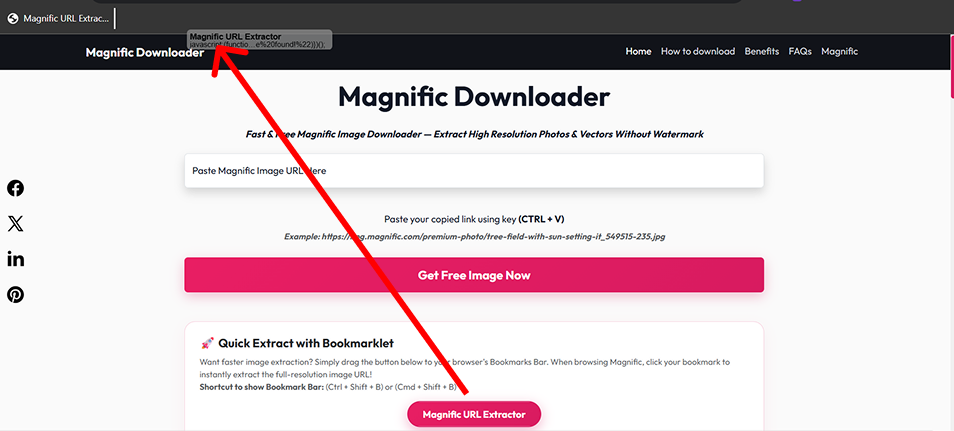
Magnific.comのアートワークページを開き、保存したブックマークをクリックします。
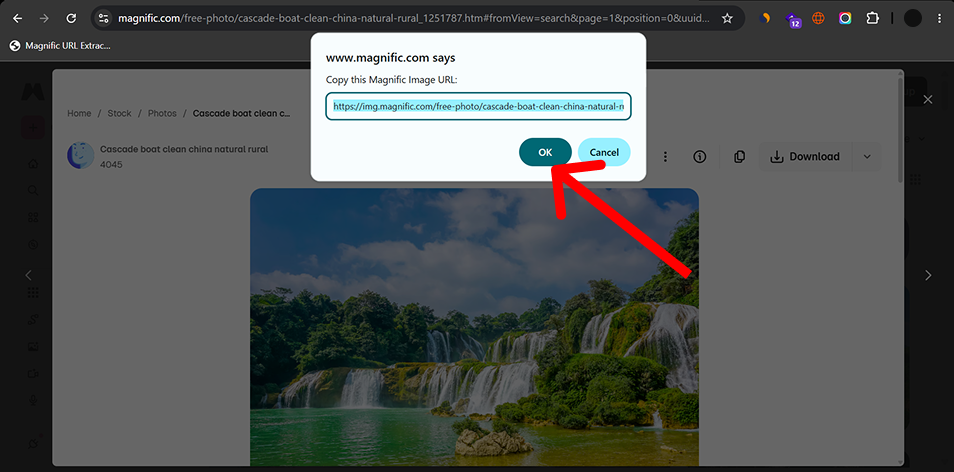
プロンプトから抽出した画像URLをコピーして、上のダウンローダーフィールドに貼り付けます。
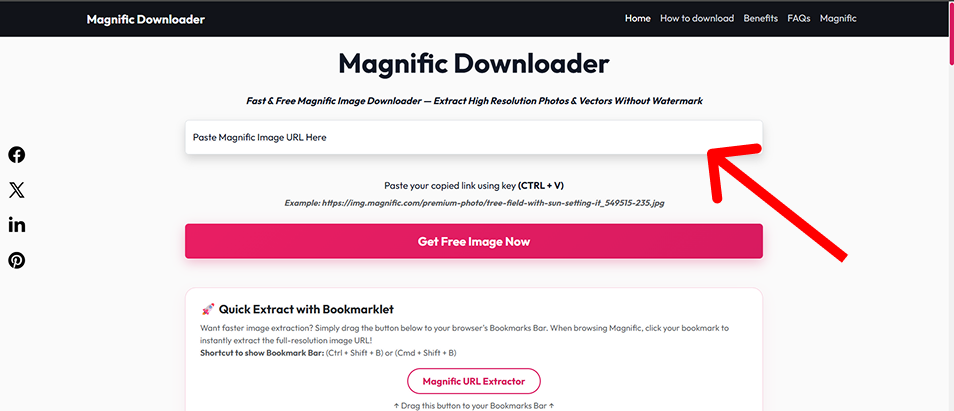
ブランドの追加や圧縮アーティファクトなしで、オリジナルの品質のMagnific写真とアップスケールされたアセットをダウンロードします。
Magnific Downloaderはアカウント登録が不要で、対応URLに対して人工的な1日のダウンロード上限を設定していません。
当社独自の抽出エンジンは、元のファイルソースに直接クエリを実行し、他のツールと比較して超高速のダウンロード速度を保証します。
ダウンロードを保存したり、動作を追跡したりすることはありません。すべてはクライアント側で、安全な暗号化された接続を介して行われます。
クライアントキャンペーン、デジタルアートワーク、および商用印刷用の高解像度の画像アセットを必要とするグラフィックデザイナーおよびアーティスト。
煩わしい透かしのないInstagram、Facebook広告、Pinterestボード用のクリスタルクリアなビジュアルを調達するソーシャルメディアマネージャー。
記事やブログの美学を高めるためにプレミアムストック写真を必要とするコンテンツクリエイター。
UI/UXのモックアップとプロトタイプ用の高品質のプレースホルダー画像とWeb対応アセットを取得する開発者。
The available resolution depends on the source image. When supported, the downloader can prepare images in common web-friendly formats.
| Format | Best For | Transparency | Typical Use |
|---|---|---|---|
| JPEG | Photos and photographic artwork | No | Web, social media, general image use |
| PNG | Graphics requiring lossless output | Yes | Design work, editing, transparency |
| WebP | Optimized web images | Yes | Websites and web applications |
Ideal for compact web previews, mobile card thumbnails, and lightweight quick embeds.
Well-suited for standard article body layouts, social media feeds, and balanced web delivery.
Largest available output option for detailed viewing, editing and high-DPI use.
Actual availability depends on the source image and the resolutions available for that image.
Selecting the right file container ensures optimal visual quality while keeping bandwidth and storage overhead minimal.
Photography, large visual images, smaller file sizes
Broad compatibility, efficient compression
No transparency, lossy compression
Graphics, screenshots, transparent assets
Lossless, transparency
Usually larger files
Websites, modern web applications
Efficient compression, supports transparency
Some older software may have limited support
| Use Case | Recommended Format |
|---|---|
| Photo for website | WebP or JPEG |
| Image for editing | PNG |
| Transparent graphic | PNG or WebP |
| Blog image | WebP |
| General compatibility | JPEG |
Magnific Downloader runs through a web browser and does not require a desktop application.
| Platform | Browser | Tool | Bookmarklet |
|---|---|---|---|
| Windows | Chrome | Supported | Supported |
| Windows | Edge | Supported | Supported |
| macOS | Chrome | Supported | Supported |
| macOS | Safari | Supported | Verify bookmarklet behavior |
| Android | Chrome | Supported | Limited / browser dependent |
| iPhone/iPad | Safari | Supported | Limited / browser dependent |
Desktop browsers provide the easiest bookmarklet workflow. Mobile users can use the normal URL input method. Actual bookmarklet behavior depends on browser capabilities.
Encountering an unexpected error or unresponsive download stream? Review the common scenarios and resolution steps below:
Possible causes: Unsupported URL, incomplete URL, or wrong page/image link.
Try: Copy the full supported image URL and paste it again.
Try:
Explanation: Available image sizes depend on the original/source image.
Try: Enable the browser bookmarks bar.
Explanation: Mobile browsers handle bookmarklets differently. Use the standard URL input method when bookmarklet functionality is not available.
Try:
If you find a broken workflow or unsupported URL, send us the details so we can investigate.
Contact UsOur guides, technical resources, and tools are built on accurate technical documentation, clear explanations, and continuous maintenance.
We reference authoritative web and image specifications (W3C, MDN) and explain image formats and compression clearly.
We distinguish between confirmed tool features, industry specifications, and practical design workflow advice.
Resolution requirements, color spaces, and file format trade-offs are presented objectively to aid creative production.
Guides and technical documentation are reviewed and updated when browser standards, formats, or tool features change.
Magnific Downloader is intended for legitimate personal, creative, educational and professional workflows. Users should only download, use, reproduce or distribute content that they own, are authorized to access, or have the appropriate rights or licenses to use.
Product names and trademarks belong to their respective owners. Magnific Downloader is an independent project and is not affiliated with or endorsed by Magnific.ai.
Learn more about the development, maintenance, and technical oversight behind this utility:
Web Developer & UI/UX Designer
Dishank designs and develops browser-based web tools with a focus on simple user interfaces, practical image workflows and useful technical resources. He maintains Magnific Downloader, refines its core workflows and oversees the site's guides and product improvements.
Explore our in-depth tutorials and technical references on AI image upscaling, resolution calculations, and digital design workflows:
Understand general generative upscaling concepts, Magnific's documented controls, and how different settings can influence image detail and resemblance.
Demystify pixel dimensions, print DPI tags, and aspect ratio math with our complete reference and interactive size calculator.
Practical recommendations for avoiding unwanted textures, managing prompt weights, and preparing clear portraits and landscapes.
Step-by-step workflow for taking raw AI generations and preparing high-resolution visuals suitable for print or large displays.