


Téléchargeur d'images Magnific rapide et gratuit — Extrayez des photos et des images haute résolution sans filigrane
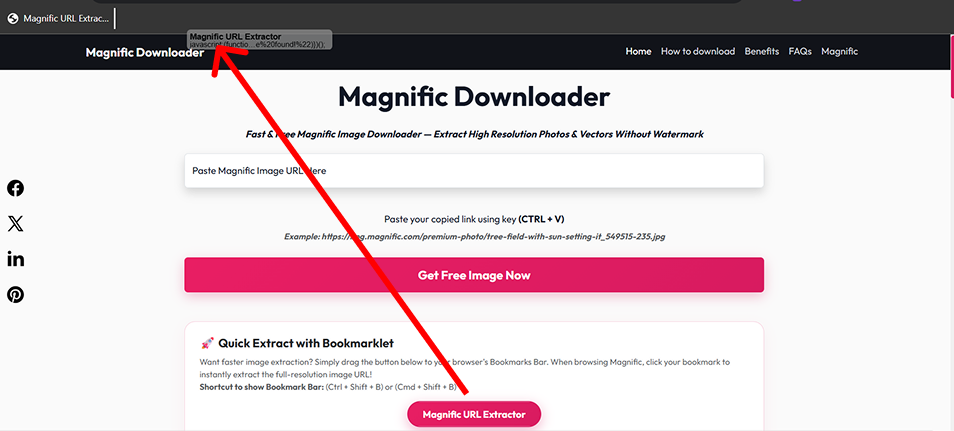
Vous voulez une extraction d'image plus rapide ? Faites simplement glisser le bouton ci-dessous vers la barre de favoris de votre navigateur. Lors de la navigation sur Magnific, cliquez sur votre signet pour extraire instantanément l'URL de l'image pleine résolution !
Raccourci pour afficher la barre de favoris : (Ctrl + Maj + B) ou (Cmd + Maj + B)
↑ Faites glisser ce bouton vers votre barre de favoris ↑
Magnific Downloader est un outil en ligne gratuit et avancé créé pour vous permettre de télécharger facilement des images Magnific et des photos mises à l'échelle sans filigrane. Que vous ayez besoin de visuels premium en taille réelle pour des œuvres d'art créatives, des actifs marketing ou des projets de conception, notre téléchargeur gratuit magnific offre un accès instantané à des résolutions personnalisées sans nécessiter d'installation de logiciel ou d'abonnements payants.
Si vous préférez l'extraction en un clic sans copier manuellement les liens, notre signet de navigateur offre une extraction directe d'URL :
Faites glisser le bouton "Magnific URL Extractor" ci-dessus directement dans la barre de favoris de votre navigateur.
Ouvrez n'importe quelle page d'illustration sur Magnific.com et cliquez sur votre signet enregistré.
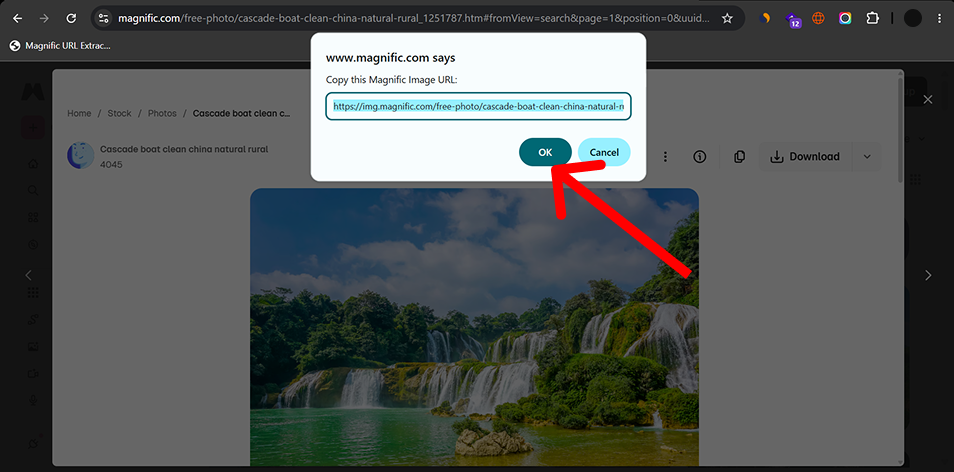
Copiez l'URL de l'image extraite de l'invite et collez-la dans le champ du téléchargeur ci-dessus !
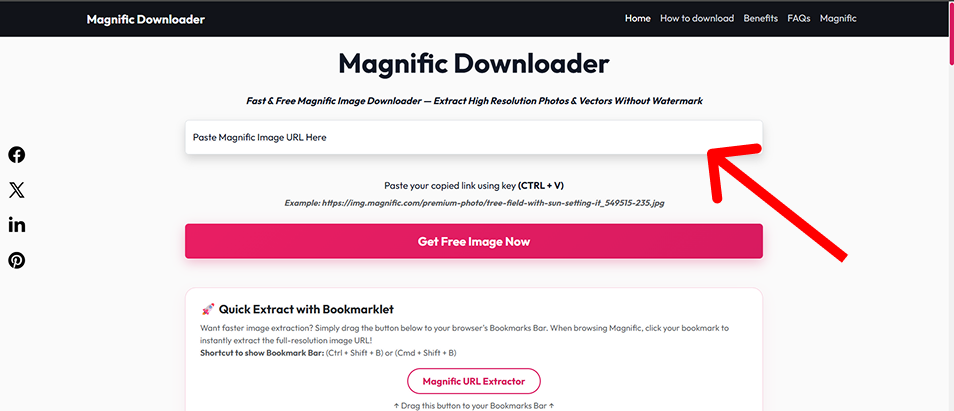
Téléchargez des photos Magnific de qualité originale et des actifs mis à l'échelle sans marque ajoutée ni artefacts de compression.
Magnific Downloader ne nécessite aucune création de compte et n'impose aucun quota quotidien artificiel sur les URL prises en charge.
Notre moteur d'extraction propriétaire interroge directement le fichier source d'origine, garantissant des vitesses de téléchargement ultra-rapides par rapport aux autres outils.
Nous ne stockons pas vos téléchargements et ne suivons pas votre comportement. Tout se passe côté client et via des connexions cryptées sécurisées.
Concepteurs graphiques et artistes qui ont besoin d'actifs d'image haute résolution pour les campagnes clients, les œuvres d'art numériques et l'impression commerciale.
Les gestionnaires de médias sociaux s'approvisionnent en visuels d'une clarté cristalline pour Instagram, les publicités Facebook et les tableaux Pinterest sans filigranes ennuyeux.
Les créateurs de contenu ont besoin de photos de stock premium pour rehausser l'esthétique de leurs articles et de leurs blogs.
Les développeurs saisissent des images d'espace réservé de haute qualité et des ressources prêtes pour le Web pour les maquettes et les prototypes UI/UX.
The available resolution depends on the source image. When supported, the downloader can prepare images in common web-friendly formats.
| Format | Best For | Transparency | Typical Use |
|---|---|---|---|
| JPEG | Photos and photographic artwork | No | Web, social media, general image use |
| PNG | Graphics requiring lossless output | Yes | Design work, editing, transparency |
| WebP | Optimized web images | Yes | Websites and web applications |
Ideal for compact web previews, mobile card thumbnails, and lightweight quick embeds.
Well-suited for standard article body layouts, social media feeds, and balanced web delivery.
Largest available output option for detailed viewing, editing and high-DPI use.
Actual availability depends on the source image and the resolutions available for that image.
Selecting the right file container ensures optimal visual quality while keeping bandwidth and storage overhead minimal.
Photography, large visual images, smaller file sizes
Broad compatibility, efficient compression
No transparency, lossy compression
Graphics, screenshots, transparent assets
Lossless, transparency
Usually larger files
Websites, modern web applications
Efficient compression, supports transparency
Some older software may have limited support
| Use Case | Recommended Format |
|---|---|
| Photo for website | WebP or JPEG |
| Image for editing | PNG |
| Transparent graphic | PNG or WebP |
| Blog image | WebP |
| General compatibility | JPEG |
Magnific Downloader runs through a web browser and does not require a desktop application.
| Platform | Browser | Tool | Bookmarklet |
|---|---|---|---|
| Windows | Chrome | Supported | Supported |
| Windows | Edge | Supported | Supported |
| macOS | Chrome | Supported | Supported |
| macOS | Safari | Supported | Verify bookmarklet behavior |
| Android | Chrome | Supported | Limited / browser dependent |
| iPhone/iPad | Safari | Supported | Limited / browser dependent |
Desktop browsers provide the easiest bookmarklet workflow. Mobile users can use the normal URL input method. Actual bookmarklet behavior depends on browser capabilities.
Encountering an unexpected error or unresponsive download stream? Review the common scenarios and resolution steps below:
Possible causes: Unsupported URL, incomplete URL, or wrong page/image link.
Try: Copy the full supported image URL and paste it again.
Try:
Explanation: Available image sizes depend on the original/source image.
Try: Enable the browser bookmarks bar.
Explanation: Mobile browsers handle bookmarklets differently. Use the standard URL input method when bookmarklet functionality is not available.
Try:
If you find a broken workflow or unsupported URL, send us the details so we can investigate.
Contact UsOur guides, technical resources, and tools are built on accurate technical documentation, clear explanations, and continuous maintenance.
We reference authoritative web and image specifications (W3C, MDN) and explain image formats and compression clearly.
We distinguish between confirmed tool features, industry specifications, and practical design workflow advice.
Resolution requirements, color spaces, and file format trade-offs are presented objectively to aid creative production.
Guides and technical documentation are reviewed and updated when browser standards, formats, or tool features change.
Magnific Downloader is intended for legitimate personal, creative, educational and professional workflows. Users should only download, use, reproduce or distribute content that they own, are authorized to access, or have the appropriate rights or licenses to use.
Product names and trademarks belong to their respective owners. Magnific Downloader is an independent project and is not affiliated with or endorsed by Magnific.ai.
Learn more about the development, maintenance, and technical oversight behind this utility:
Web Developer & UI/UX Designer
Dishank designs and develops browser-based web tools with a focus on simple user interfaces, practical image workflows and useful technical resources. He maintains Magnific Downloader, refines its core workflows and oversees the site's guides and product improvements.
Explore our in-depth tutorials and technical references on AI image upscaling, resolution calculations, and digital design workflows:
Understand general generative upscaling concepts, Magnific's documented controls, and how different settings can influence image detail and resemblance.
Demystify pixel dimensions, print DPI tags, and aspect ratio math with our complete reference and interactive size calculator.
Practical recommendations for avoiding unwanted textures, managing prompt weights, and preparing clear portraits and landscapes.
Step-by-step workflow for taking raw AI generations and preparing high-resolution visuals suitable for print or large displays.