


快速免费的 Magnific 图像下载器 — 无水印提取高分辨率照片和图像
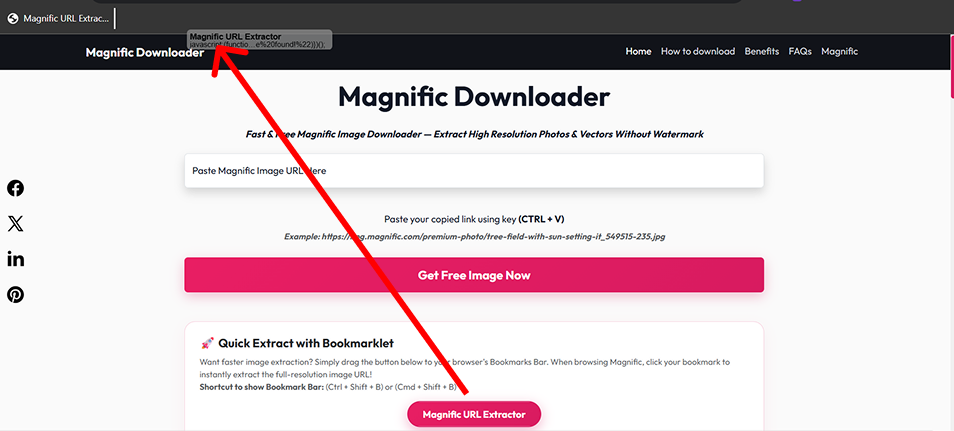
想要更快的图像提取?只需将下方的按钮拖到您的浏览器书签栏即可。浏览 Magnific 时,单击您的书签即可立即提取全分辨率图像 URL!
显示书签栏的快捷键:(Ctrl + Shift + B) 或 (Cmd + Shift + B)
↑ 将此按钮拖到您的书签栏 ↑
Magnific Downloader 是一款高级、免费的在线工具,旨在让您轻松下载 Magnific 图像和放大的照片,无水印。无论您是需要用于创意艺术作品、营销资产还是设计项目的全尺寸优质视觉效果,我们的 magnific 免费下载器 都能以自定义分辨率提供即时访问,无需任何软件安装或付费订阅。
如果您更喜欢一键提取而不用手动复制链接,我们的浏览器书签可提供直接的 URL 提取:
将上面的 "Magnific URL 提取器" 按钮直接拖到您的浏览器书签栏。
在 Magnific.com 上打开任何艺术品页面,然后单击您保存的书签。
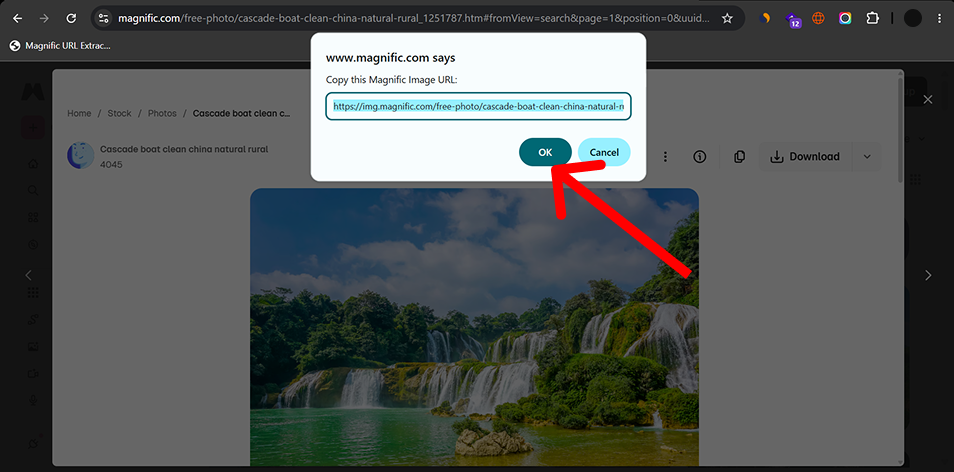
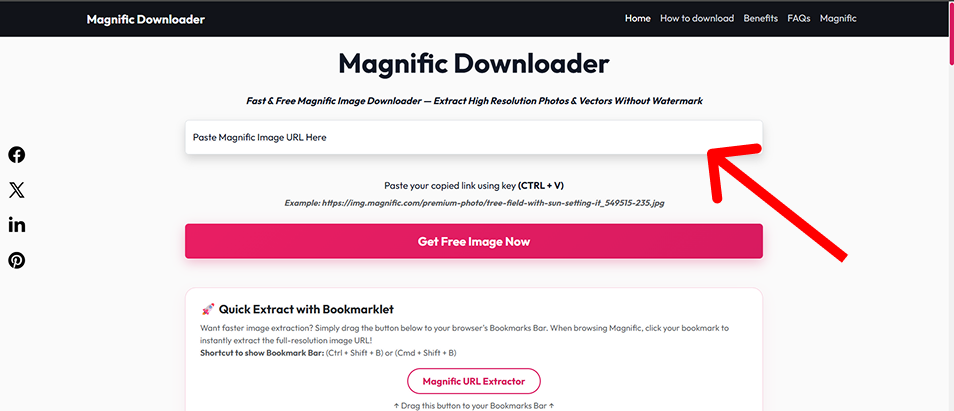
从提示中复制提取的图像 URL,并将其粘贴到上面的下载器字段中!
下载原始质量的 Magnific 照片和放大的资产,没有添加品牌或压缩伪影。
Magnific Downloader 无需注册账号,且不会对受支持的链接设置人为的每日下载配额。
我们专有的提取引擎直接查询原始文件源,与其他工具相比,可确保闪电般的下载速度。
我们不会存储您的下载内容或跟踪您的行为。一切都在客户端通过安全的加密连接发生。
平面设计师和艺术家需要高分辨率的图像资源用于客户活动、数字艺术品和商业印刷。
社交媒体经理为 Instagram、Facebook 广告和 Pinterest 板采购清晰的视觉效果,没有烦人的水印。
内容创作者需要优质的库存照片来提升他们的文章和博客的美感。
开发人员为 UI/UX 模型和原型抓取高质量的占位符图像和适合 web 的资源。
The available resolution depends on the source image. When supported, the downloader can prepare images in common web-friendly formats.
| Format | Best For | Transparency | Typical Use |
|---|---|---|---|
| JPEG | Photos and photographic artwork | No | Web, social media, general image use |
| PNG | Graphics requiring lossless output | Yes | Design work, editing, transparency |
| WebP | Optimized web images | Yes | Websites and web applications |
Ideal for compact web previews, mobile card thumbnails, and lightweight quick embeds.
Well-suited for standard article body layouts, social media feeds, and balanced web delivery.
Largest available output option for detailed viewing, editing and high-DPI use.
Actual availability depends on the source image and the resolutions available for that image.
Selecting the right file container ensures optimal visual quality while keeping bandwidth and storage overhead minimal.
Photography, large visual images, smaller file sizes
Broad compatibility, efficient compression
No transparency, lossy compression
Graphics, screenshots, transparent assets
Lossless, transparency
Usually larger files
Websites, modern web applications
Efficient compression, supports transparency
Some older software may have limited support
| Use Case | Recommended Format |
|---|---|
| Photo for website | WebP or JPEG |
| Image for editing | PNG |
| Transparent graphic | PNG or WebP |
| Blog image | WebP |
| General compatibility | JPEG |
Magnific Downloader runs through a web browser and does not require a desktop application.
| Platform | Browser | Tool | Bookmarklet |
|---|---|---|---|
| Windows | Chrome | Supported | Supported |
| Windows | Edge | Supported | Supported |
| macOS | Chrome | Supported | Supported |
| macOS | Safari | Supported | Verify bookmarklet behavior |
| Android | Chrome | Supported | Limited / browser dependent |
| iPhone/iPad | Safari | Supported | Limited / browser dependent |
Desktop browsers provide the easiest bookmarklet workflow. Mobile users can use the normal URL input method. Actual bookmarklet behavior depends on browser capabilities.
Encountering an unexpected error or unresponsive download stream? Review the common scenarios and resolution steps below:
Possible causes: Unsupported URL, incomplete URL, or wrong page/image link.
Try: Copy the full supported image URL and paste it again.
Try:
Explanation: Available image sizes depend on the original/source image.
Try: Enable the browser bookmarks bar.
Explanation: Mobile browsers handle bookmarklets differently. Use the standard URL input method when bookmarklet functionality is not available.
Try:
If you find a broken workflow or unsupported URL, send us the details so we can investigate.
Contact UsOur guides, technical resources, and tools are built on accurate technical documentation, clear explanations, and continuous maintenance.
We reference authoritative web and image specifications (W3C, MDN) and explain image formats and compression clearly.
We distinguish between confirmed tool features, industry specifications, and practical design workflow advice.
Resolution requirements, color spaces, and file format trade-offs are presented objectively to aid creative production.
Guides and technical documentation are reviewed and updated when browser standards, formats, or tool features change.
Magnific Downloader is intended for legitimate personal, creative, educational and professional workflows. Users should only download, use, reproduce or distribute content that they own, are authorized to access, or have the appropriate rights or licenses to use.
Product names and trademarks belong to their respective owners. Magnific Downloader is an independent project and is not affiliated with or endorsed by Magnific.ai.
Learn more about the development, maintenance, and technical oversight behind this utility:
Web Developer & UI/UX Designer
Dishank designs and develops browser-based web tools with a focus on simple user interfaces, practical image workflows and useful technical resources. He maintains Magnific Downloader, refines its core workflows and oversees the site's guides and product improvements.
Explore our in-depth tutorials and technical references on AI image upscaling, resolution calculations, and digital design workflows:
Understand general generative upscaling concepts, Magnific's documented controls, and how different settings can influence image detail and resemblance.
Demystify pixel dimensions, print DPI tags, and aspect ratio math with our complete reference and interactive size calculator.
Practical recommendations for avoiding unwanted textures, managing prompt weights, and preparing clear portraits and landscapes.
Step-by-step workflow for taking raw AI generations and preparing high-resolution visuals suitable for print or large displays.